



fastlindyrick
-
Posts
36 -
Joined
-
Last visited
-
Days Won
1
Content Type
Profiles
News
Forums
Blogs
Gallery
Events
Everything posted by fastlindyrick
-
 Hey everyone, I made another lego fan art album for Words of Radiance, covering part 2 and the interludes through I8. Here's the link: http://www.facebook.com/media/set/?set=a.10204588445459150.1073741835.1474667500&type=1&l=a5db382e61 As long as people seem to like them, I'll keep posting them here. However, if there is a better place for me to post this, please let me know. Feedback is welcome, as are suggestions on what to do next.
 -
Kari-no-sugata, thanks; though that doesn't explain the difference in the POVRAY results relative to Paul Bourke's results, which match mine... -Rick
-
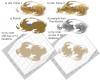
Can someone who has run the POVRAY code confirm that a full 50 iterations were used? I ask because if you look at the image on the Paul Bourke site (image d in the attachment here), there is a hole in the middle, relative to the comparable frame from the animation (image b ). I coded it up myself in matlab to get an independent assessment, and the hole is there if more than 12 iterations are run (image f), whereas the image looks right if not enough iterations are run, say 12 or less (image e). The example in the POVRAY documentation suggests 8 iterations, with 20 as a default... Youngy, skaaa, and Kari-no-sugata all appear to have downloaded POVRAY so if one of you can confirm this I'd appreciate it. Side note: my images don't match perfectly partly because it was hard to get the perspective to match POVRAY and partly because POVRAY cheats and doesn't check every point, but rather makes a few assumptions and approximations to speed up the computation, but I rotated the images in 3d and the perspective issue doesn't seem to account for the discrepancy.
-
Lego album of Words of Radiance part 1 [spoilers]
fastlindyrick replied to fastlindyrick's topic in Stormlight Archive
Thanks, everyone! -
Lego album of Words of Radiance part 1 [spoilers]
fastlindyrick replied to fastlindyrick's topic in Stormlight Archive
I used waterslide decals to make the tattoos and such. I downloaded and cropped the images then resized them to fit on the minifigs. I did the writing letter by letter using harakeke's translation of the script. -
Lego album of Words of Radiance part 1 [spoilers]
fastlindyrick posted a topic in Stormlight Archive
Hey everybody, I've posted another lego gallery, this time featuring part 1 of Words (through the first set of interludes). Minor spoilers, but I made sure not to include any references to anything past that point in the book. The link is https://www.facebook.com/media/set/?set=a.10204046680875374.1073741833.1474667500&type=1&l=f1ba0bd743 . Many thanks to Peter Ahlstrom for granting permission on behalf of Brandon/Dragonsteel to use copyrighted images from the book's interior. Feedback is welcome. -
Ha! Actually I'm married to a gorgeous redhead who has her own (much smaller) collection of Legos. I can't get her to read Sanderson, though, so she's almost, but not quite, perfect.
-
Yesterday I added some photos of a chasmfiend if anyone is interested...
-
Mysty and Colby Jack: I had most of the parts that you can't see, which form the structural support, as well as about half of the minifigures. I had to buy all of the dark tan peices, the parshendi, and the shardbearers. I probably paid about $500 total; the Parshendi were the worst, since those pieces are quite rare. But now I can re-use them for scenes from the rest of the series.
-
In case you haven't seen it on Facebook yet, I created a lego version of the shattered plains, specifically the Battle of the Tower: https://www.facebook.com/media/set/?set=a.10203527555737570.1073741830.1474667500&type=1&l=d7de9ddc50 I'd like to thank 17th Sharders Windrunner, Natans, hoser, eveorjoy, deddinty, and Inkthinker for the forum discussion of appropriate colors a few months back. I need something else to do now that that's done, so I'm open to suggestions.
-
Does anyone know what color the shattered plains are? The cover art depicts them as red, but I don't trust cover art and anyway that could just be due to the sunset. I have scoured the text and have not found any specific reference to the ground other than frequent references that it is stone. I'm trying to recreate them in Lego, so any other relevant environmental descriptors would be helpful. Thanks!
